

There is a common opinion that 2D art is for situations when publishers are on a budget and can’t afford to spend resources on expensive 3D art. This is far from the truth. Every style and tool opens new opportunities for game design. 2D is not a limitation. It’s a choice.
In 2025, cinematic realism in 3D graphics reached the point where it’s sometimes more realistic than cinema itself. With AI-assisted 3D modeling, creating highly detailed 3D assets takes less time than before. And yet it hasn’t replaced other game art styles. 2D visuals are not only surviving – they’re thriving.
Many hits of recent years, such as Balatro, Hades, Nine Sols, Super Mario Bros. Wonder, the games nominated and winning numerous awards, all of them are made with 2D art.
2D art has the power to awaken special emotions. Whether it’s the nostalgic charm of pixel art, the emotional weight of hand-drawn scenes, or the clean precision of modern UI design, 2D styles bring something irreplaceable to the table: clarity, creativity, and a visual identity players remember.
So how do you create 2D game art that works in 2025? What tools do artists use, how do they keep things consistent across large teams, and where does AI fit into all this? Let’s break it down – from concept to final asset.
What is 2D Game Art, and why is it still relevant in 2025?
2D game art is everything visual in a game that’s drawn flat – characters, backgrounds, buttons, and effects. Unlike 3D models, these are images without depth, whether hand-drawn, pixel art, or vector shapes.
But don’t mistake “flat” for “simple.” From moody, painterly scenes to bright, cartoonish styles, 2D art gives designers endless creative freedom. It’s what you are likely to see in platformers, mobile hits, and even award-winning indie games.
3D art entered mass video games 30 years ago, but 2D art hasn’t disappeared since. In 2025, when creating highly detailed, realistic 3D art with the help of AI became easier than ever, 2D art is still around. Now we can say for sure: it’s not just about complexity or price. It’s about unique art styles and a variety of games.
2D games aren’t just a niche affair: they are winning major gaming awards every year. There is a number of situations when 2D art is preferable: when game wants to be set apart by a unique art style (such as Nine Sols), when developers go for a more basic visuals because they want to focus on game mechanics rather than heavy visuals (such as Balatro), when designers want to convey retro style and go for nostalgic feelings.
And on top of that, there are games that don’t need any intricate visuals to be wildly successful and profitable. An example of that is Candy Crush, a game that can be enjoyed on any phone and captures the attention (and money) of millions of players while keeping its visuals to the most basic.
What foundational 2D art principles are critical in 2025?
Although 2D art doesn’t reinvent itself every year, there have been some nuances that gained specific importance for artists nowadays, when AI can create art assets in a matter of seconds.
Although AI is undoubtedly winning at generating images fast in a variety of styles, there are things that it can’t yet imitate successfully. Here is what human 2D artists can leverage in 2025:
- Consistent style across a whole project. AI tends to drift between images, and it’s still hard for it to keep a clear track of characters and environments used previously.
- Silhouette clarity: your character or object should be recognizable at a glance.
- Composition and visual storytelling: unique creative input that is still largely unaccessed by AI tools.
- UI/UX design according to the best usability practices.

2D UX/UI design by Kevuru Games
A 2D artist who has strong skills in these principles can combine them with their own unique art style and use AI tools for separate tasks to succeed in the field.
Software and tools needed for modern 2D game artists
In most cases, a 2D artist can get away with one good graphic editor. However, a wider set of software can ease the work and open more possibilities. 2D artists at Kevuru Games use these tools:
- Photoshop (PS): Classic tool for painting, editing, and polishing 2D art.
- Illustrator (AI): Perfect for creating scalable vector graphics like logos and icons.
- Procreate: A favorite for sketching and hand-drawn illustration on tablets.
- Blender: Used for basic 3D blocking or reference, even in 2D projects.
- Figma: Great for UI/UX design and prototyping game interfaces.
- Stable Diffusion: an AI tool for quick concept generation or background variations.
- MidJourney: AI-powered visual brainstorming and style exploration.
- A piece of paper and a pencil – still the best thing ever invented for visual brainstorming and concept sketching.
How to choose and maintain consistent 2D art styles for your game?

2D environment by Kevuru Games
Creating art for a video game means having loads of assets that likely were created over a long period of time. Maintaining a consistent art style for all of them isn’t easy, even for an experienced artist, and the task becomes more complex when a team of artists works on one project.
Our 2D art department has established a number of rules that help us to keep the style consistent when working in teams of any size. Here are the key principles:
- Style guide, developed at the very beginning of the project and approved by the client. Must include color palette, line style, level of detail, and visual dos and don’ts.
- Reference board, shared by the entire team.
- One person as a lead artist, even in a team of two. Someone needs to review and approve all assets to catch style breaks early.
- Using shared files. It’s important that brushes, textures, and templates are in a shared folder, so everyone uses the same tools.
- Regular reviews. Artists check work-in-progress assets together to fix inconsistencies fast, and make sure that the client will say their word during the work and not just in the end.
If you manage to adhere to these rules, there will be no issues with stylistic unity of the project. Remember: defining your visual identity early helps avoid inconsistency and keeps your 2D game art styles focused and memorable across all assets.
Process for creating great 2D character design and environments
With years of experience in professional 2D art creation, we’ve developed a workflow optimized for working with teams of any size. Here is what it looks like:
1. Concept Research and Reference Gathering
Every project starts with collecting references and moodboards to define the style and tone. This keeps the whole team aligned and ensures consistent visuals from the start.
2. Shape and Style Definition
We build core shapes and silhouettes – whether it’s characters, environments, or props. This stage locks in the unified style and sets the visual foundation.
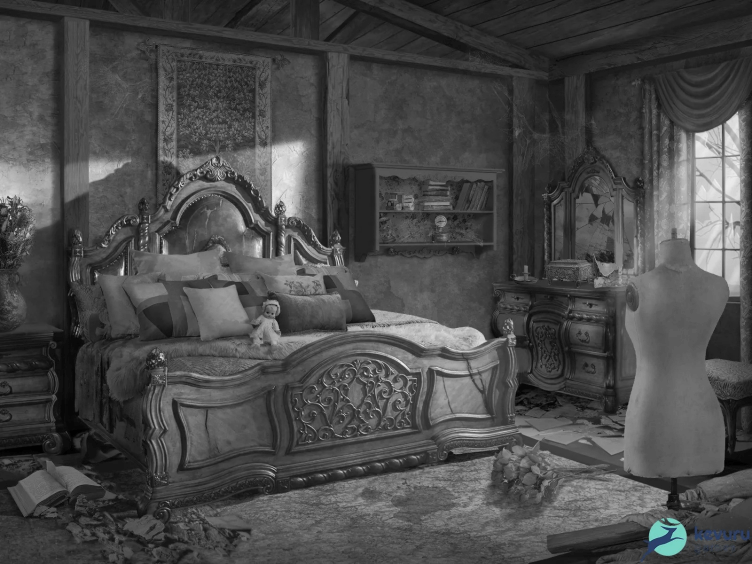
Black and white sketch of 2D environment by Kevuru Games
3. Sketching and Variations
Multiple sketch options are created for each asset. Quick iterations help test ideas and choose the strongest direction before adding details.
4. Color and Material Exploration
We test different color schemes to match the game’s mood and make elements pop. Final palettes are chosen for consistency across all assets.
5. 3D Blocking (If Needed)
For complex scenes, we build quick 3D blockouts to get angles and proportions right. This step helps keep the final 2D art accurate.
6. Lineart and Cleanup
Once sketches are approved, clean lineart finalizes shapes and details. This is where designs get locked in before rendering.
7. Rendering and Polishing
Assets are shaded, textured, and polished until they’re game-ready. This is where sketches turn into finished, production-ready visuals.
8. File Optimization and Layering for Animation (If Needed)
For animated assets, we prepare layered files so everything’s ready for rigging and movement.
9. Consistency Check and QA Review
We check every asset for style consistency, color harmony, and usability. Nothing leaves the pipeline without a full review.
10. Delivery and Support for Integration
Final assets are exported, organized, and delivered ready for integration. We stay available for tweaks and tech support to help with smooth implementation.
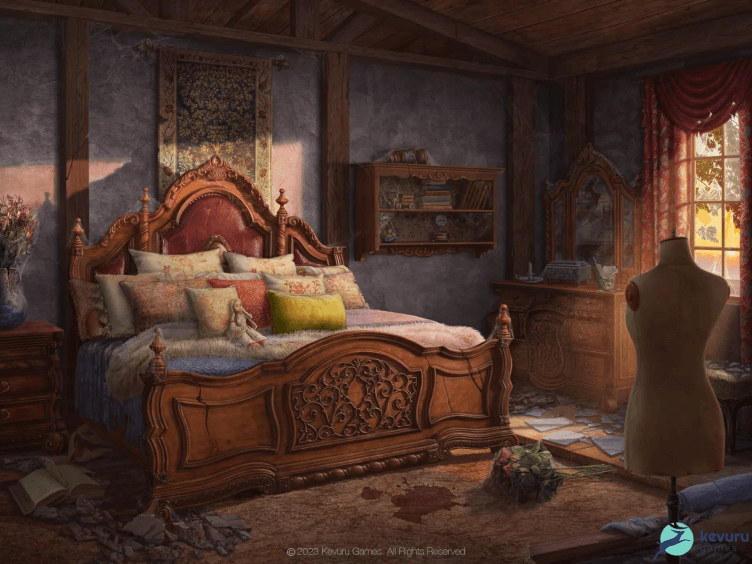
2D environment by Kevuru Games
How can you animate 2D assets for dynamic gameplay?
When you get to animate 2D art, there are two main ways: rigging and bone animation or frame-by-frame animation. Each of them has pros and cons, and the choice depends on your situation. Here is the info you need to make the choice:
- Rigging and bone animation are created by breaking characters or objects into parts (arms, legs, head) and animating them using “bones” inside software like Spine or DragonBones. After initial rigging is done (1-2 days), the movement can be applied in a couple of hours. The animation is lighter and integrates into the game engine more easily. However, the movements are more basic than the following option.
- Frame-by-frame animation means drawing each movement frame separately. It’s perfect for complex animation, detailed, expressive characters, and hand-drawn styles, but requires more of the artist’s time. It can be done in a graphic editor like Photoshop or Procreate.
“Minor” animation, like shader effects (simple movements like waving flags, flickering lights) or particle systems (smoke, magic, or explosions) can be added directly in the game engine.
Most companies that provide 2D game development services have professional animators on the team who will work with 2D artists to create the best animation that best suits the game.
How is AI 2D game art creation and workflows in 2025?
As mentioned earlier, AI can be used by skilled artists as a tool that doesn’t replace human creativity and craft, but helps brainstorm and speed up the boring parts of the work. Here are some examples of the use of AI in 2D game art:
- Backgrounds & Textures: AI is great for generic backgrounds or texture fills, especially for large or non-critical elements. This is tedious work that can take a lot of time and exhaust the artists.
- Cleanups & Upscaling: AI tools refine lineart, upscale images, or auto-color rough sketches. These are all repetitive tasks that don’t require creative artistic thought.
Many artists also use AI tools for concept generation and variation creation. It helps to create moodboards, concepts, and style tests easily. However, it makes them skip seemingly unnecessary but important steps in the discovery stage, such as learning about the origin of the style they’re going for, the context, and other artists’ creative processes.
Remember that AI never generates art out of nowhere; it’s always a product of someone else’s work. Getting the style reference directly from Midjourney strips away all the details about the history of a particular style that could be useful for a deep understanding of the work.
Some other art elements that can be generated by AI are color palette options and lighting variations. This can save a lot of time in the early-stage exploration. However, for beginner artists, it’s highly recommended not to skip these stages, even if it means spending some more time. The time spent on learning will pay off in double.
The best strategy for AI assistance is to use it in case when you know how to get the result, but with AI tools, you could make it faster.
What are the best practices for optimizing 2D art for game engine integration?
Even a genius artist could fail at game art design if they created art without knowing how to optimize it for game engine integration. Optimization is essential for the assets to look good in the game and perform smoothly across devices.
Here are some basic rules for 2D art optimization:
1. Use power-of-two (PoT) textures to help with mipmapping and compression.
2. Pack sprites efficiently.
- Combine multiple sprites into a single atlas to reduce draw calls and try to avoid too much padding, but leave enough margin to prevent bleeding.
3. Clean up art assets
- Remove unused layers, trim transparent pixels, and flatten layers when exporting. Use consistent naming conventions (e.g., enemy_walk_01.png).
4. Optimize file formats
- Use PNG for crisp, lossless assets (UI, pixel art).
- Use JPEG or WebP for large, non-transparent backgrounds.
5. Match the engine’s requirements
- Export in correct DPI, resolution, and format based on the game engine (e.g., Unity, Unreal, Godot).
- Test how assets behave in-engine early and often.
6. Balance quality and performance
- Don’t go overboard with resolution – scale to the game’s visual needs.
- Use compression smartly to maintain a good balance between size and clarity.
7. Pivot around pivot points
- Set correct pivot/anchor points (e.g., feet for characters, center for projectiles) to ensure proper animation and placement.
8. Maintain consistent art style and resolution
- Keep visual elements stylistically and proportionally consistent.
- Stick to a defined pixel-per-unit ratio or resolution scale.
Where to find a Good 2D Game Art Studio?
If, some years ago, finding a good 2D game development company near you wasn’t always easy, now the problem is quite the opposite. When all the companies of the world that offer 2D game development services are available for remote work, it can be very hard to make a choice. So how do you do it?
For every 2D game art studio, a portfolio comes before anything else. Look at their website and ask for a personal presentation if interested: sometimes, the most interesting projects are hidden under NDA.
If the portfolio looks good, search for the reviews. On websites like Clutch or GoodFirms, you can find detailed feedback from various clients who have worked with the company before.
Such websites show approximate pricing policies, but don’t rely on that until you see the quote for your project. Money matters, for sure, but let it be the last thing you check, not the first one.
Conclusion. Why 2D Game Styles Continue to Thrive in 2025
In 2025, 2D game art is as relevant and powerful as ever. While AI tools, 3D engines, and real-time rendering have advanced tremendously, 2D art continues to dominate genres, define iconic styles, and power some of the most beloved indie and mobile games in the world.
While 3D game art becomes increasingly realistic and detailed, 2D remains the space for artists to use creativity, experiment with different styles and make unique visual stories.
The strength of 2D lies not in technical complexity but in clarity, emotion, and artistic identity. There’s a variety of styles, such as nostalgic pixel art, sleek UI elements, or hand-drawn characters. At the same time, there’s always potential for creative innovation. In 2025, 2D art remains a vital part of the game development world.
With the right tools, optimized workflows, and a deep understanding of design principles, artists can create visuals that not only look stunning but also integrate smoothly into any game engine. In a world full of noise and visual overload, 2D game art offers something timeless: style, storytelling, and simplicity with impact.
And if you’re looking for a team to create that unique 2D art for your game, check out our portfolio – Kevuru Games has extensive experience in working with games of different genres and styles.


